- Code & Peddle Newsletter
- Posts
- Automate More with HubSpot's latest Upgrades
Automate More with HubSpot's latest Upgrades
Let HubSpot kill manual work, add safety to your AI workflows, turn LinkedIn articles into a moat, tame Meta’s crops, and make your content worth quoting in AI overviews.

Code Peddle
April 07, 2026


Hey there, Digital Marketing Rockstars! 🎸
Manmeet here, this week is about tightening the pipes, not adding more noise: HubSpot doing more of the grunt work for you, OpenAI pulling the industry toward safer AI, LinkedIn quietly rewarding long form, Meta giving you finer creative control, and AI overviews exposing which content actually deserves to surface.
In today's email:
1. HubSpot’s March automation and AI upgrades. 📈
2. OpenAI’s safety bug bounty and what it means for marketers. 🤖
3. LinkedIn articles as a growth and AI visibility channel.💡
4. Meta’s new creative controls for stronger paid performance. 👀
5. Why your content misses AI overviews and how to fix it. 🌐
Marketing Automation

HubSpot’s March 2026 Updates: More Automation, Smarter AI
HubSpot’s latest release leans hard into “less manual work”: you get safer workflow revisions, auto-added line items on deals, and automations that trigger straight off meetings. Breeze AI now answers multi-object reporting questions in plain language, while Customer Agent picks up image understanding, better language controls, and clearer setup flows so you can get something reliable live faster.
Our Hot Take:
Use this as an excuse to retire three spreadsheets. Anywhere you are still manually adding deal products, updating follow-up tasks after meetings, or hacking reports together in Sheets should be first in line for these upgrades. Let Breeze AI handle the “what does the data say” questions your team asks every week, and keep Customer Agent scoped to one or two high-value jobs instead of trying to make it do everything. The win is fewer copy-paste rituals and fewer “can someone pull this report” messages, not another shiny AI demo.
Content Marketing

OpenAI Launches Safety Bug Bounty To Curb AI Misuse
OpenAI is rolling out a safety-focused bug bounty that pays people to find ways AI systems could be misused, not just hacked. They are explicitly hunting for prompt injections, data exfiltration paths, large-scale harmful actions, and ways people might slip past existing safeguards, with reports routed straight to safety and security teams so fixes ship faster.
Our Hot Take:
For you, this is a reminder to treat AI as infrastructure, not a toy. If you are plugging models into workflows that touch customer data, campaigns, or code, you should have your own “safety review” before anything goes live. That can be as simple as a checklist: what happens if someone feeds it bad prompts, can it leak internal info, and what is the worst thing it could post or send on your behalf? Borrow the mindset from OpenAI: assume misuse attempts are coming and design guardrails now, instead of apologising later.
Social Media Marketing / PPC
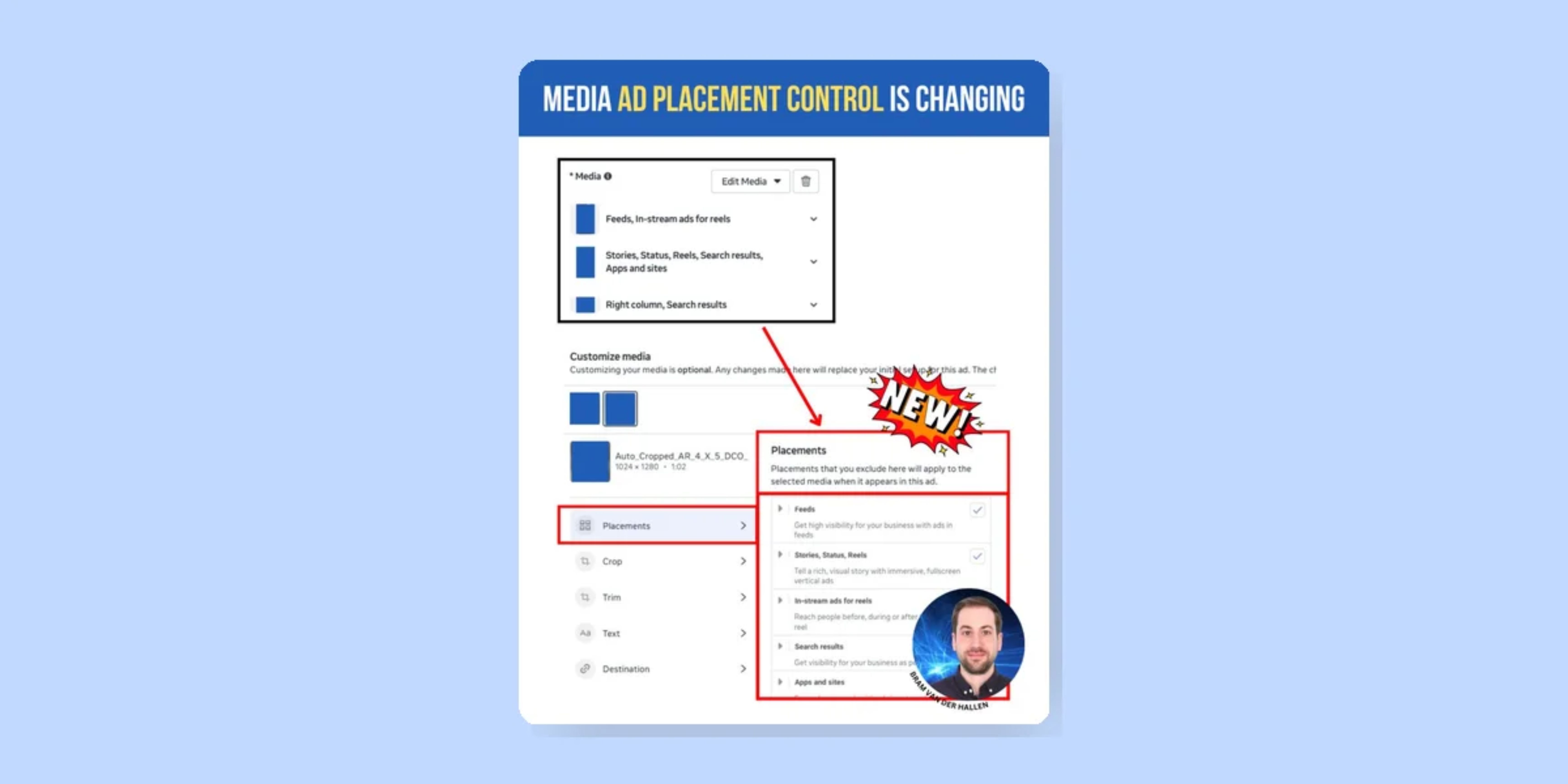
 LinkedIn Articles: Your Shortcut To Deeper Reach And AI Visibility LinkedIn is pushing long-form articles again as a way to deepen in feed engagement and show up more often in AI chatbot answers. The playbook is familiar but still underused: consistent pieces on clear topics, real thought leadership, skimmable formatting, and cross promotion through newsletters, creator features, and paid boosts so the right people actually see the work. | Meta’s New Creative Controls: Smarter Crops, Stronger AdsMeta now lets you upload multiple aspect ratios and then tweak each asset inside a dedicated “customize media” view, adjusting crops, text, destinations, and placement exclusions at a granular level. If you do nothing, Meta will auto-optimize crops per placement and user, which is powerful but also a good way to ship creative you never actually approved. Our Hot Take: |
SEO

Why Your Content Isn’t Showing Up in AI Overviews (And What To Fix)
If you rarely see your pages in AI overviews, it is usually not a penalty; it is that your content is thin, unfocused, or structurally hard to reuse. AI systems prefer pages that map cleanly to intent with clear headings, strong entities, supportive schema, and real authority signals like relevant links and depth on a topic.
Our Hot Take:
Audit your top money pages as if you were the overview model. Does each one clearly answer a specific question, with headings that line up to subquestions and sections that can stand on their own when quoted? Tighten entities, add schema where it is missing, and fold related FAQs into the page so machines do not have to guess. Then look at links and topical depth: if you have one shallow page on a theme and your competitor has ten good ones plus links, you know why they get the mention.
Recommended Readings
HubSpot just shipped a batch of “everyday” upgrades: better file management with bulk drag and marquee select, clearer ownership with new file filters, and Google Drive-powered knowledge vaults that feed secure docs straight into custom AI agents. It is less about shiny features and more about making your CRM cleaner, faster, and safer to automate around.
Meta has added “At least” and “In the past” filters to engagement-based custom audiences, so you can retarget people based on how often and how recently they interacted with your profiles, posts, or CTAs. That lets you separate casual scrollers from the people who keep coming back.
Claim Your Platform Audit

Ensure Precision: Secure Your MA Platform Audit Now!
Here’s what you can expect:
Lead Generation and Conversion
Email Marketing Performance
Website and Content Analytics
Lead Management and Nurturing
Customer Relationship Management
Tip of the Week
Pick one place where AI already touches your work and harden it. That might mean tightening a HubSpot workflow Breeze AI now powers, adding a simple review step before AI-assisted content goes live, defining two themes for LinkedIn articles, or rewriting one key page so it is the obvious choice for an overview. Small guardrails now beat damage control later.💡
Summary:
Here’s your quick recap:
Marketing Automation: Let HubSpot’s new automation and AI take over three of your most annoying manual tasks this month. 📈
Content: Borrow OpenAI’s safety mindset and add a basic risk review to any workflow where AI can act on your behalf. 🤖
Social: Use LinkedIn articles as the home base for your best ideas, then feed every other format from there. 💡
PPC: Take control of Meta’s new creative tools so your ads look the way you intend in each placement. 👀
SEO: Rewrite and structure your key pages so AI overviews see them as clean, quotable answers, not vague blog posts. 🌐
Meme of the Week